

 See units
Nautical publications and chart corrections: almanacs, pilot books, lists of lights and Notices to Mariners
Correcting a paper chart
1The lesson in plain words
Check what is missing. Use ink for permanent corrections and pencil for T&P notices. Record each change.
Why still paper
Many yachts carry paper charts as an independent backup. For races adopting World Sailing's Offshore Special Regulations (OSR), Categories 0–3 require charts that are not solely electronic. Commercial small-craft requirements depend on the applicable national rules. The UKHO has said it will keep a full paper chart service until at least 2030, while it withdraws parts of the range case by case.
Where the chart stands
Check the chart number and edition date against the current official listing. Replace a superseded edition. On an ADMIRALTY chart, the bottom-left Small corrections block records permanent notices applied, by year and number. Compare the complete record with official lists and archives; one recent entry does not prove earlier corrections were applied. Check all T&P notices still in force separately.
Applying a correction
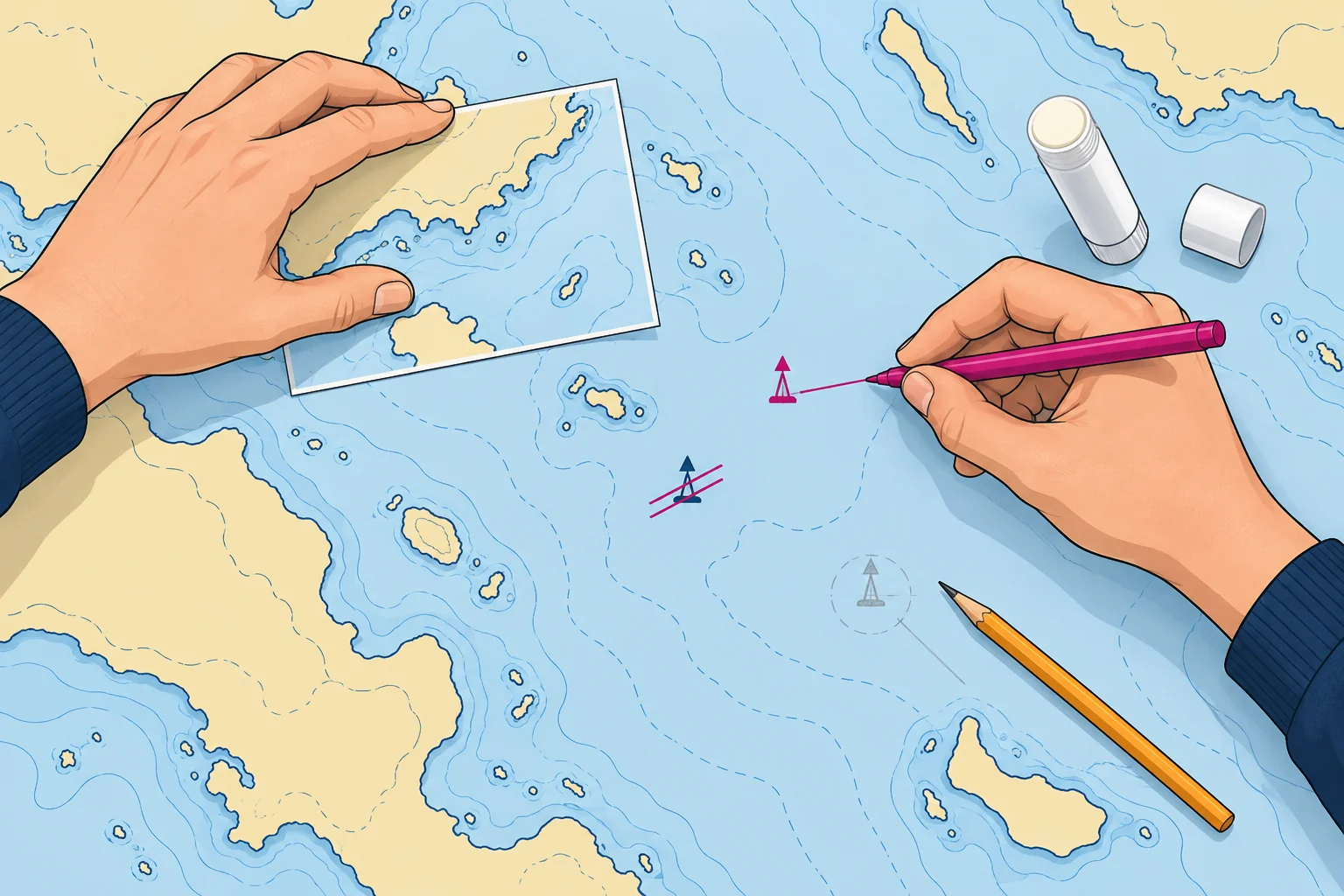
Use a fine waterproof pen, magenta or violet, so corrections stand out from the print. Draw new symbols with the chart's own symbols from INT 1 (NP5011), and link a new symbol to its exact position with a fine line if needed. Strike out deleted features with two fine lines; never erase or paint over them. Some notices come with a block: a printed patch you cut out and paste over the area.
Small-craft charts
Correction arrangements vary by chart series. Use the publisher's current notices and instructions for your exact chart number, series and edition. Confirm that the chart is still supported; an archived leisure-chart notice page does not prove it remains current.
Keep a record
After checking each permanent correction, enter its notice number and year in Small corrections. Keep a separate record of active T&P notices and remove entries when cancelled. Your chart log should show the permanent correction status, outstanding T&P information and the date checked.
2Step by step
Bringing a paper chart up to date
- 1
Confirm the chart number and current edition; replace a withdrawn or superseded chart.
Corrections for another edition may not apply; a superseded chart needs replacement.
- 2
Compare the complete correction record with official lists and archives; obtain every missing permanent correction.
A recent entry can hide missing earlier permanent corrections.
- 3
Apply permanent corrections in order, using fine waterproof magenta or violet ink and supplied blocks.
Ink lasts and stands out; blocks replace areas with many changes.
- 4
Check all T&P notices still in force, including older ones; remove cancelled entries and pencil in current information.
An active T&P notice may be older than the latest permanent correction; pencil allows later removal.
- 5
Check every correction against its notice and confirm the chart remains legible.
A correction is useful only if it matches the notice and you can read the chart clearly.
- 6
Record permanent notice numbers and years in Small corrections; log T&P entries and the date checked separately.
Separate records let you check permanent corrections and temporary information independently.
3Key data
- Small corrections
- Bottom-left margin: permanent notices by year and number
- Permanent corrections
- Fine waterproof magenta or violet ink; strike out, never erase
- T&P corrections
- Pencil; erase when cancelled
- UKHO paper charts
- Full service until at least 2030; parts withdrawn case by case
- Spanish terms
- Corrección de cartas, correcciones menores, cartas en papel
4Key points
- 1
Confirm the edition is current and check the complete correction record for gaps.
- 2
Permanent corrections in fine magenta or violet waterproof ink; T&P in pencil.
- 3
Strike out deleted features; never erase. Paste blocks where provided.
- 4
Record permanent notices in Small corrections; log active T&P notices and the date checked separately.
5Frequent mistakes
Wrong: Erase a deleted light and redraw the area.
Right: Strike it out with fine lines, so the change is clear and checkable.
Wrong: Any pen will do for corrections.
Right: Use a fine waterproof pen in magenta or violet, so it stays clear and stands out.
6Practice case & exam keys
Your borrowed chart has two missing permanent corrections. The latest T&P in-force list also includes a temporary wreck buoy. How do you update the chart?
Show the answer
Confirm the edition is current and check the full permanent record for gaps. Apply missing permanent notices in fine waterproof magenta or violet ink, using supplied blocks. Check all T&P notices still in force, including older ones; pencil in the wreck buoy only if its notice remains active. Check your work. Record permanent notice numbers and years in Small corrections; log active T&P notices and the date checked separately.
Exam keys
- Small corrections block: year and notice number.
- Magenta or violet waterproof ink; T&P in pencil; strike out, never erase.
- Blocks pasted over the area; symbols from INT 1 (NP5011).
- UKHO paper chart service until at least 2030.
Finish this unit
When you've read it, match the terms, then answer three questions. Get them all right to finish the unit; opening the page alone doesn't count.
My notes for this unit
No notes