

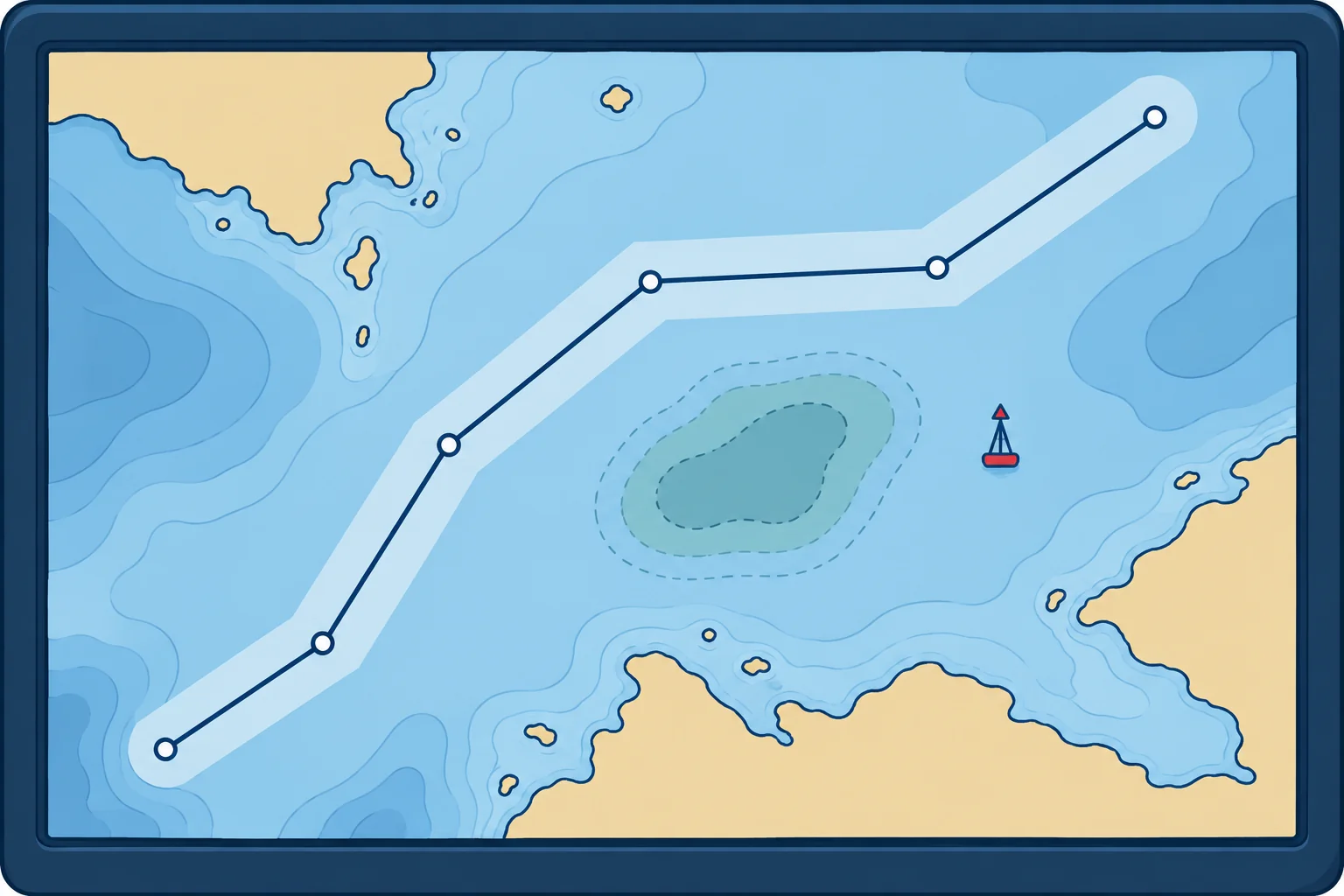
Route planning and route checking on ECDIS
1The lesson in plain words
The automatic route check and your visual check complement each other. Use both; neither guarantees that the route is safe.
Building the route
Enter waypoints from the passage plan. Set each leg's cross-track limit (XTL), the permitted distance on either side of the track. Check the whole corridor for dangers. Set a turn radius, the radius of the planned curved turn, that your ship can follow. Mark critical points, where you must act or make a navigation decision. Add planned speeds. Use suitable non-zero XTL values. A zero limit can cause repeated alerts; check the manual and verify that the deviation alert works.
Automatic route check
The route check tests the whole corridor against the safety contour, isolated dangers and selected areas. Resolve each result by changing the route or verifying safe passage and recording the reason and necessary controls. A note alone does not make a danger safe. A long list still needs review. Verify the settings, then review every result; never reduce required protection merely to shorten the list.
Visual check end to end
IMO's good-practice guidance, MSC.1/Circ.1503, warns that some ECDIS miss small land areas and some dangers on small-scale cells. After the automatic check, go along the whole route on the largest-scale ENC, in All other mode, and look. Use the cursor query on anything doubtful. Check light sectors and notes the same way.
Approval
The officer who built the route presents it. The master approves it before departure, and any change during the voyage is checked and approved again. Record the safety contour, safety depth, XTL and look-ahead used. A route changed in a hurry and not approved is a classic step towards grounding.
Monitoring
Under way, keep the route and look-ahead active and check that the position source is the one intended. Cross-check the position by radar ranges, bearings and visual marks. ECDIS shows where the sensors say you are, not where you are. Keep the display at a suitable scale, not overscale, with the best cell loaded.
2Step by step
Checking a route before approval
- 1
Check and correct update status and permits for every cell along the route.
An out-of-date cell can hide a new danger or changed buoyage.
- 2
Confirm safety contour, safety depth and XTL for planning; set look-ahead for monitoring.
Route checking examines the planned corridor; look-ahead checks ahead of the ship under way.
- 3
Run the automatic route check on the whole route; rerun after changes.
It finds charted dangers and areas the system can detect in each corridor.
- 4
Read and resolve every item on the result list.
Ignored warnings have led directly to groundings.
- 5
Inspect the route end to end on the largest-scale ENC in All other mode.
Some dangers and small land areas are missed by the automatic check.
- 6
Brief the plan and get the master's approval; repeat after any change.
An unapproved, hurried change is a common cause of groundings.
3Key points
- 1
Set a suitable non-zero cross-track limit for each leg and verify the deviation alert.
- 2
Resolve every route-check result. Verify settings without reducing required protection to shorten the list.
- 3
Finish with a visual check end to end on the largest-scale ENC in All other mode.
- 4
The master approves the route, and approves it again after any change.
4Frequent mistakes
Wrong: If the route check gives no alarm, the route is safe.
Right: Some dangers and small land areas are missed, especially on small-scale cells. Always add a visual check end to end.
Wrong: A visual check at overview scale is enough.
Right: Small-scale cells omit detail. Check on the largest-scale ENC available, in All other mode.
Wrong: A small change to the route at sea does not need approval.
Right: Any change is checked and approved again. Hurried, unapproved changes appear again and again in grounding reports.
5Practice case & exam keys
At 2300 the second officer revises the route to save time, cutting inside a charted bank. She checks it visually at a small scale and saves it. The route check shows several hundred warnings, which she dismisses as usual. The master is asleep. What should have happened?
Show the answer
Check the revised route and obtain approval before using it. Verify chart status and required safety settings without reducing protection to shorten the list. Resolve every route-check result, including all affected-leg warnings, and recheck the changed route. Inspect it on the largest-scale ENC in All other mode. Call the master for approval before using it. This resembles the failures before the Muros grounding in 2016.
Exam keys
- Each leg: cross-track limit, turn radius, critical points; corridor clear of safety contour and dangers.
- Automatic route check + visual check end to end on the largest-scale ENC in All other mode (MSC.1/Circ.1503).
- Master approves the route and every change; monitor with look-ahead and independent position checks.
Finish this unit
When you've read it, match the terms, then answer three questions. Get them all right to finish the unit; opening the page alone doesn't count.
My notes for this unit
No notes