
Meteorology · Level R4 · 5 parts · about 14 min
GRIB files and weather models: use and limits
5 short parts: GRIB files · Models · Grid & timing · Ensembles · Gusts & limits. Each part explains the idea, then gives the points to remember, the common mistakes, a worked case and a practice question; the Academy unit adds all 27 check questions.
1 · GRIB files
What a GRIB file is and how to get one at sea
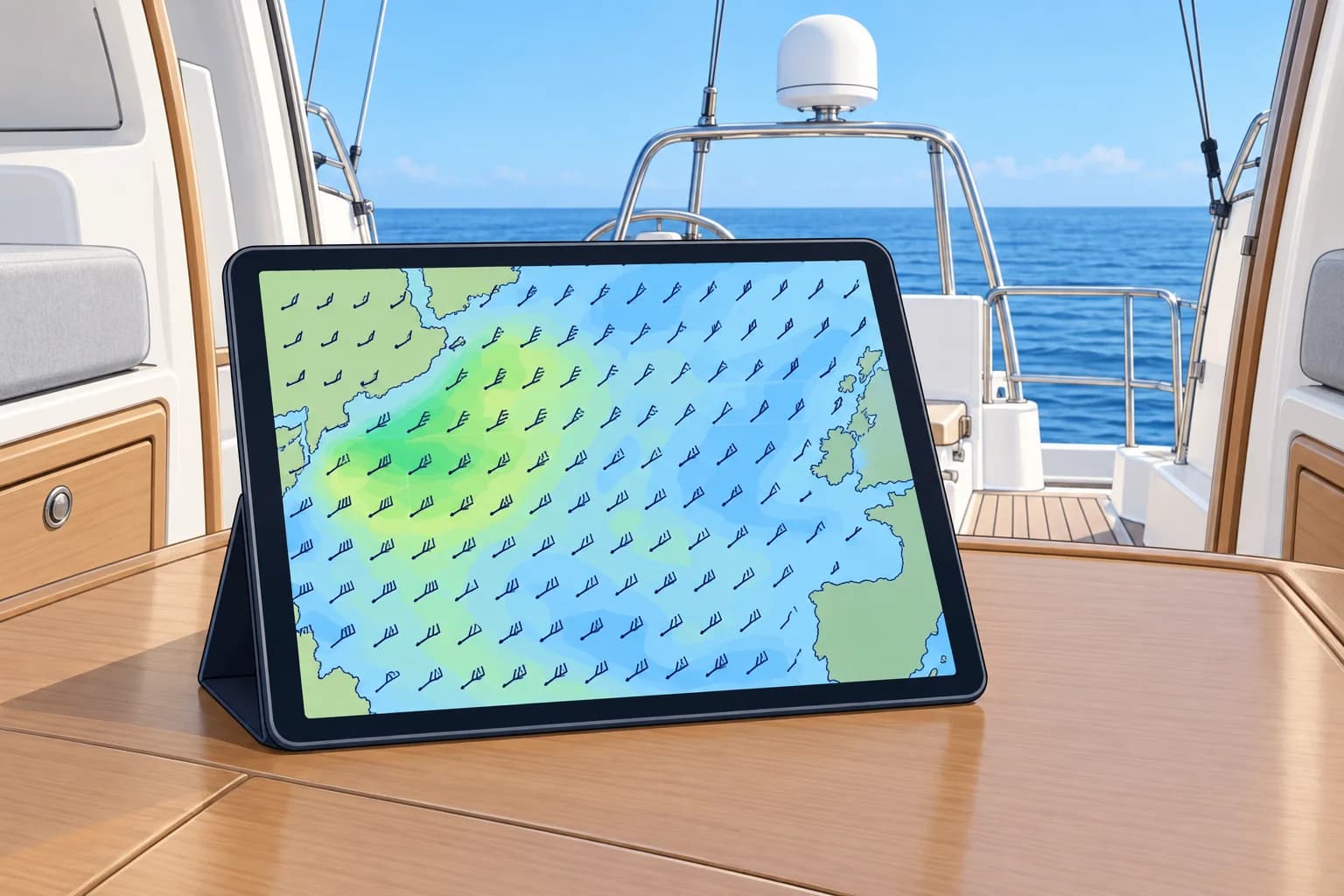
Here, GRIB means a file of weather-model forecasts. It holds values at grid points; your app draws arrows and colours. Small files work on slow links.
Gridded numbers
A weather model is a computer program that forecasts the atmosphere from today's observations. Its output is a set of values on a grid of points: wind, pressure, rain and more, for each forecast time. GRIB (gridded binary) is the WMO (World Meteorological Organization) standard format for sending it. Two editions are in use: GRIB1 and the newer GRIB2. Your app or plotter reads the numbers and draws the wind arrows, isobars and colour shading.
Choosing a file
You choose the model, the area, the grid spacing, the forecast times and the parameters: for example 10 m wind, mean sea-level pressure, gusts, rain and waves. A larger area, finer grid, more forecast times or more parameters usually means a larger file. With other choices unchanged, halving the grid spacing gives about four times as many points and roughly four times the file size.
Getting it ashore
On land, apps and websites download GRIB files directly or show model output without a file at all. Free GRIB viewers and many plotters accept standard files. Check which model and run each app shows; some blend models without saying which.
Getting it at sea
Offshore you may have only a slow satellite or high-frequency (HF) radio link. Email services such as Saildocs send a GRIB file in reply to a short request message naming the model, area, spacing, times and parameters. Satellite internet is now common on yachts and makes larger downloads easy, but a small, well-chosen file still arrives fastest when the link is poor.
Not an official forecast
These files contain model output, not a forecaster-edited marine bulletin. They do not include official warnings. Use them alongside official forecasts, as the Forecast sources unit explains.
Key figures
- GRIB
- GRIdded Binary: WMO format, editions 1 and 2
- Typical parameters
- 10 m wind, sea-level pressure, gusts, rain, wave height
- File size
- Halve the grid spacing → about four times the size
- Email request
- Model, area, grid spacing, forecast times, parameters
Remember
- These files hold values at grid points; the app draws them.
- You choose model, area, spacing, times and parameters; each changes the file size.
- Email services like Saildocs send small files over slow links.
- These files contain model output without official warnings.
Common mistakes
Wrong: These files are forecaster-edited marine bulletins.
Right: They contain model output, not a forecaster-edited bulletin, and do not include official warnings.
Wrong: Download the finest grid for the whole ocean.
Right: Pick the area and spacing you need. A small file arrives over a slow link; a huge one may not.
Worked case
Mid-passage, you have a slow satellite email link. You want the wind for the next three days over the 300 NM ahead. Your crew asks for the finest grid, every hour, with ten parameters. What do you request?
Show the answer
Ask only for what you need: a box a little bigger than your route, a moderate grid spacing such as 0.25° or 0.5°, forecast times every 3 or 6 hours out to 72 hours, and a few parameters: 10 m wind, pressure, gusts and perhaps rain or waves. The file stays small enough to download. Then compare it with the latest official high-seas forecast.
Practice question
What do the GRIB files discussed here contain?
- A forecaster's written bulletin
- Model values at grid points
- A satellite photo of clouds
- A list of gale warnings
Show the answer
Answer: B. These files hold model values at grid points for each forecast time. Your app draws them.
2 · Models
Global and regional models
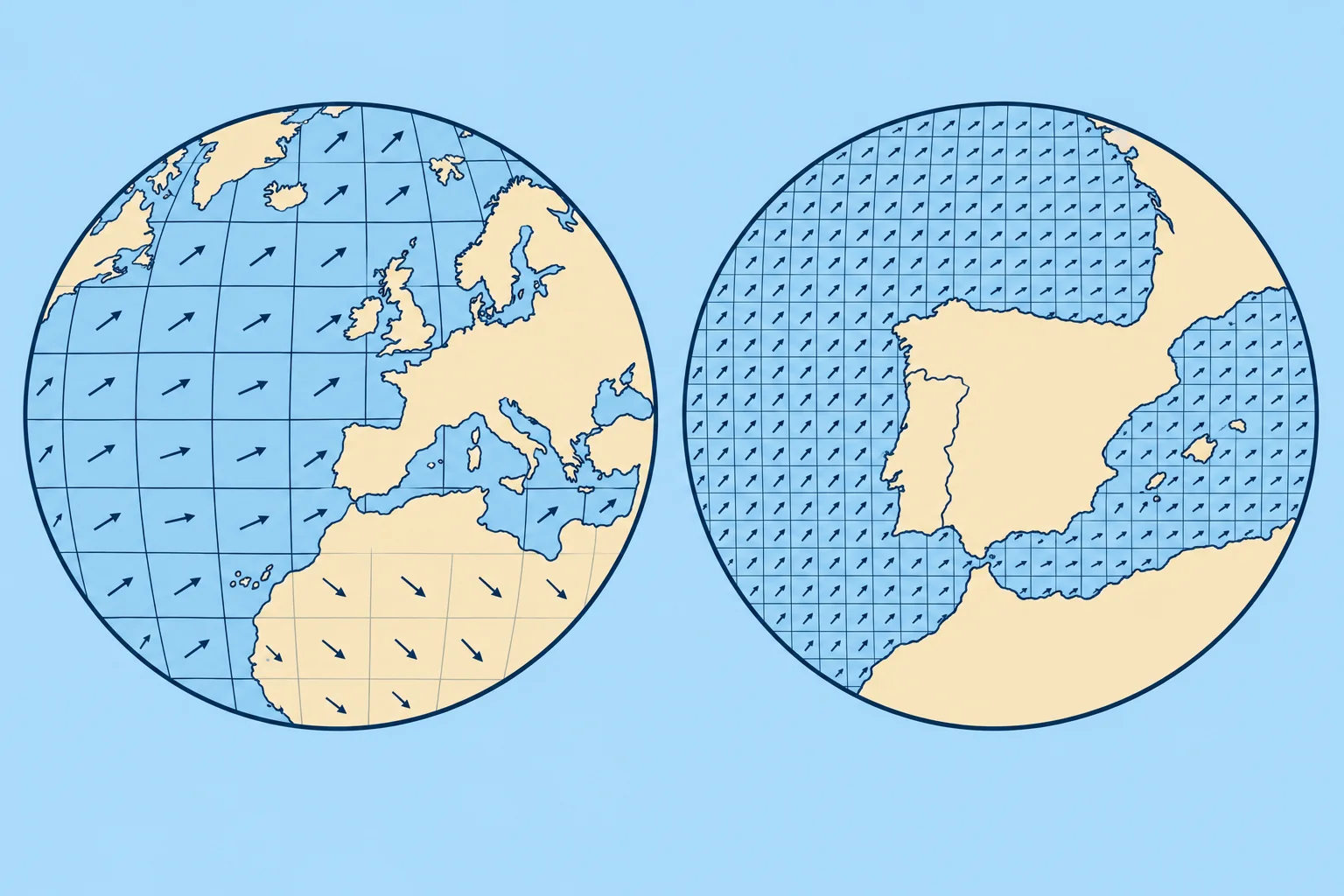
Global models cover the world. Regional models cover smaller areas on finer grids. Their forecast ranges vary; check which product you are using.
GFS
The US GFS (Global Forecast System) of NOAA runs four times a day, at 00, 06, 12 and 18 UTC, and its standard output is on a 0.25° grid, about 28 km in latitude, out to 16 days. It is free and the default model in many apps.
ECMWF
The European Centre for Medium-Range Weather Forecasts runs the IFS (Integrated Forecasting System) at about 9 km, four times a day; its main runs reach 15 days. Since 1 October 2025 ECMWF's real-time forecast data have been open at full native resolution under a free licence, so many apps now offer the 9 km data. ECMWF also runs AIFS, a machine-learning model, also open, on a coarser grid.
Regional models
Regional models cover a limited area at finer grid spacing. Their forecast ranges vary. Germany's DWD runs ICON-EU, about 7 km over Europe for about 5 days, and ICON-D2, about 2 km over central Europe for about 2 days. Météo-France runs AROME at about 1.3 km over France. Spain's AEMET runs HARMONIE-AROME at about 2.5 km for Iberia and the Balearics and for the Canaries, to 48 hours.
Waves
Wave models, such as NOAA's WAVEWATCH III and ECMWF's wave model, use forecast winds to predict wave height, period and direction. Significant wave height is the average height of the highest third of waves; individual waves can be larger. Wind errors affect the wave forecast, and coastal detail is limited.
Which to use
Use a global model for the big picture and days ahead; use a regional model near the coast and for the next day or two. Compare two models: when they agree, confidence is higher; when they disagree, plan for both.
Key figures
- GFS (NOAA)
- 0.25° grid, 4 runs a day, to 16 days
- ECMWF IFS
- About 9 km, 4 runs a day; open data since 1 Oct 2025
- ICON-EU / ICON-D2 (DWD)
- About 7 km to 5 days / about 2 km to about 2 days
- AROME / HARMONIE-AROME
- About 1.3 km (France) / about 2.5 km (AEMET, Spain), to ~2 days
Remember
- GFS: free, 0.25°, four runs a day, to 16 days.
- ECMWF IFS: about 9 km, open at full resolution since 1 October 2025.
- Regional models add detail; check their coverage and forecast range.
- Compare models: agreement raises confidence; disagreement means plan for both.
Common mistakes
Wrong: The highest-resolution model is always the best forecast.
Right: Finer grids show more detail but can place it wrongly. Compare models and runs.
Wrong: Every regional model has the same forecast range.
Right: Ranges vary: ICON-D2 reaches about two days; ICON-EU reaches about five. Use global models for the longer outlook.
Worked case
You plan to cross from mainland Spain to the Balearics in 48 hours. GFS shows a force 4 on the route; ECMWF IFS shows a force 6 with a stronger gradient near the coast; HARMONIE-AROME shows a force 6 funnelling round the coast at departure. How do you read this?
Show the answer
Force 6 is a plausible outcome; do not average it away. The regional model suggests coastal acceleration, but finer detail can still be misplaced. Model agreement is useful, not proof: models can share errors. Check official AEMET forecasts and warnings, compare later runs for the same place and valid time, and assess the stronger outcome against your own limits.
Practice question
What is the standard grid spacing of GFS output?
- About 0.25°
- About 1.5°
- About 2.5 km
- About 9 km
Show the answer
Answer: A. GFS standard output is on a 0.25° grid, about 28 km in latitude.
3 · Grid & timing
Resolution, run times and forecast range
A model's grid spacing is not the size of what it can forecast. Know which run you have, how old it is and how far ahead it can be trusted.
Grid spacing
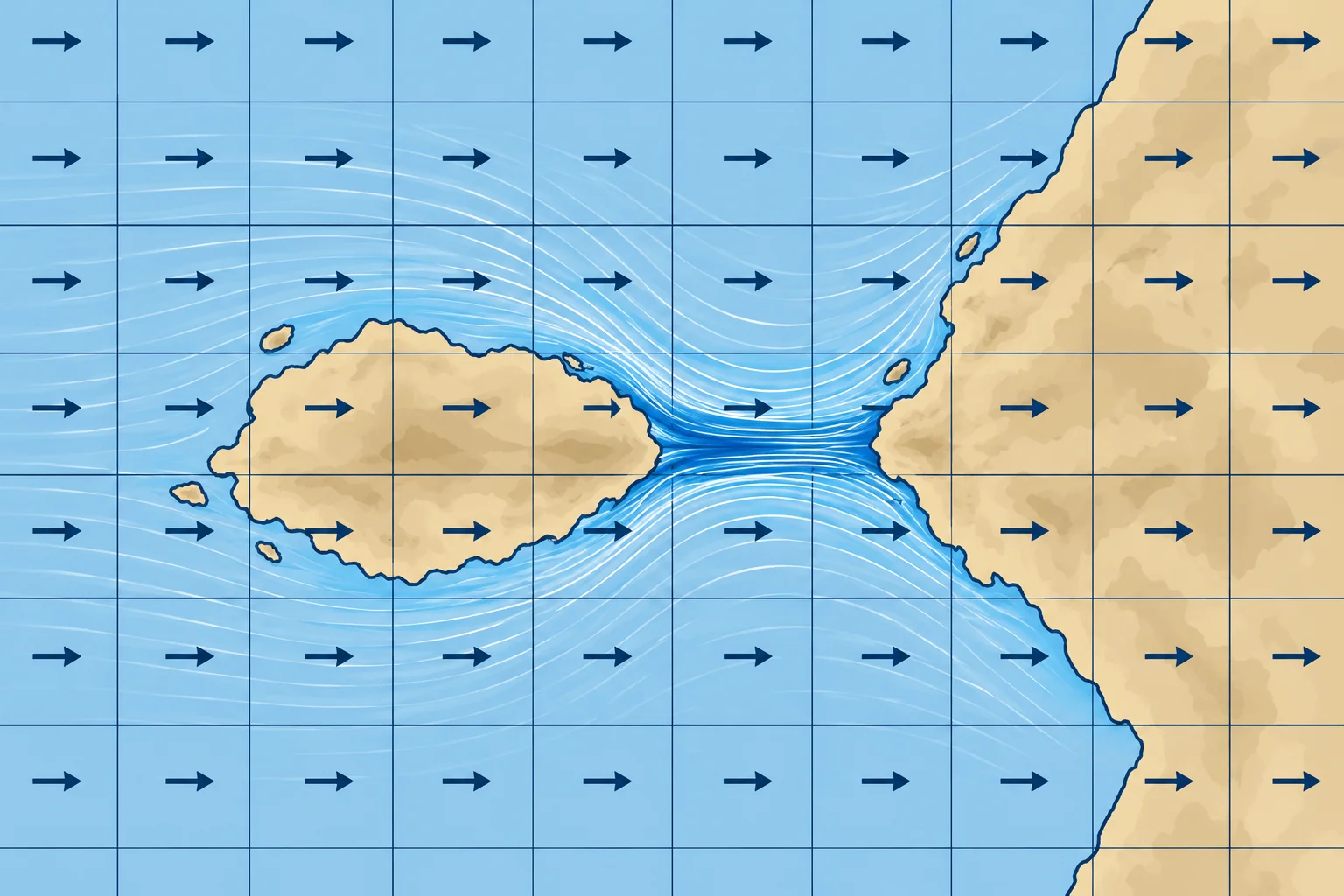
Grid spacing is the distance between model points. Effective resolution describes the smallest scales represented usefully, often about four to seven times that spacing. For a 9 km grid, think roughly 40–60 km, not individual headlands or narrow straits. This is an approximate scale, not a guarantee of forecast accuracy.
Interpolation
Your app often interpolates, drawing smooth colours and arrows between the points, and may show a value for your exact position. That smoothness is drawing, not detail. Choosing a finer display than the model's grid adds nothing.
Runs and their age
Each model run is a new forecast based on observations for a stated starting time. Run times use UTC (Coordinated Universal Time). T+12 means 12 hours after that start; it is a duration, not a clock time. Add it to the run time to find the valid time. Data arrive hours later, so check the run date and time. Apps may display UTC or local time: check the setting and use the newest available run.
How far ahead
Forecast skill drops with time. The first one to three days are usually useful for planning a passage; beyond about five days, use trends, not details.
Run-to-run
Compare the latest run with the one before. Consistent runs give more confidence; a forecast that flips from run to run is uncertain, however detailed it looks.
Key figures
- Effective resolution
- Often about 4–7 × the grid spacing
- Forecast times
- T+ = hours after run start; check valid time and time zone
- Run times
- Usually 00, 06, 12 and 18 UTC; data arrive hours later
- Useful range
- Details 1–3 days; beyond about 5 days, trends only
Remember
- Effective resolution is several times the grid spacing; small features are missed.
- Smooth app graphics are interpolation, not extra detail.
- Check run date, valid time and the app’s time zone; use the latest run.
- Compare successive runs: consistency supports confidence, but runs can share errors.
Common mistakes
Wrong: A 9 km model forecasts the wind in a 2 km strait.
Right: Features need several grid points. The strait's funnelling is far below its effective resolution.
Wrong: The file I downloaded today is today's forecast.
Right: It may be an older run. Check the run date, valid time and the app’s time zone.
Worked case
At 0900 local time (UTC+2) on Tuesday 14 July 2026, you open a GRIB downloaded at 0730. Its run is dated Monday 13 July, 18 UTC. The displayed step is T+12. When is it valid, and how do you check whether it is the newest run?
Show the answer
T+12 is Tuesday 14 July at 0600 UTC, or 0800 local: one hour ago. The download time does not establish freshness. Check the provider’s available run dates and times, allowing for publication delay. Obtain the newest available run, confirm it covers your passage times and compare forecasts for the same valid time.
Practice question
Using the approximate 4–7 × rule, what effective resolution corresponds to a 9 km grid?
- About 1 to 2 km
- About 40 to 60 km
- About 9 km, one grid box
- About 500 km or more
Show the answer
Answer: B. Four to seven times 9 km gives roughly 40–60 km. This approximate scale describes representation, not guaranteed accuracy.
4 · Ensembles
Ensembles: how sure is the forecast?
An ensemble runs a model from slightly different starting states. Its spread helps you judge uncertainty; close agreement does not guarantee accuracy.
Why ensembles
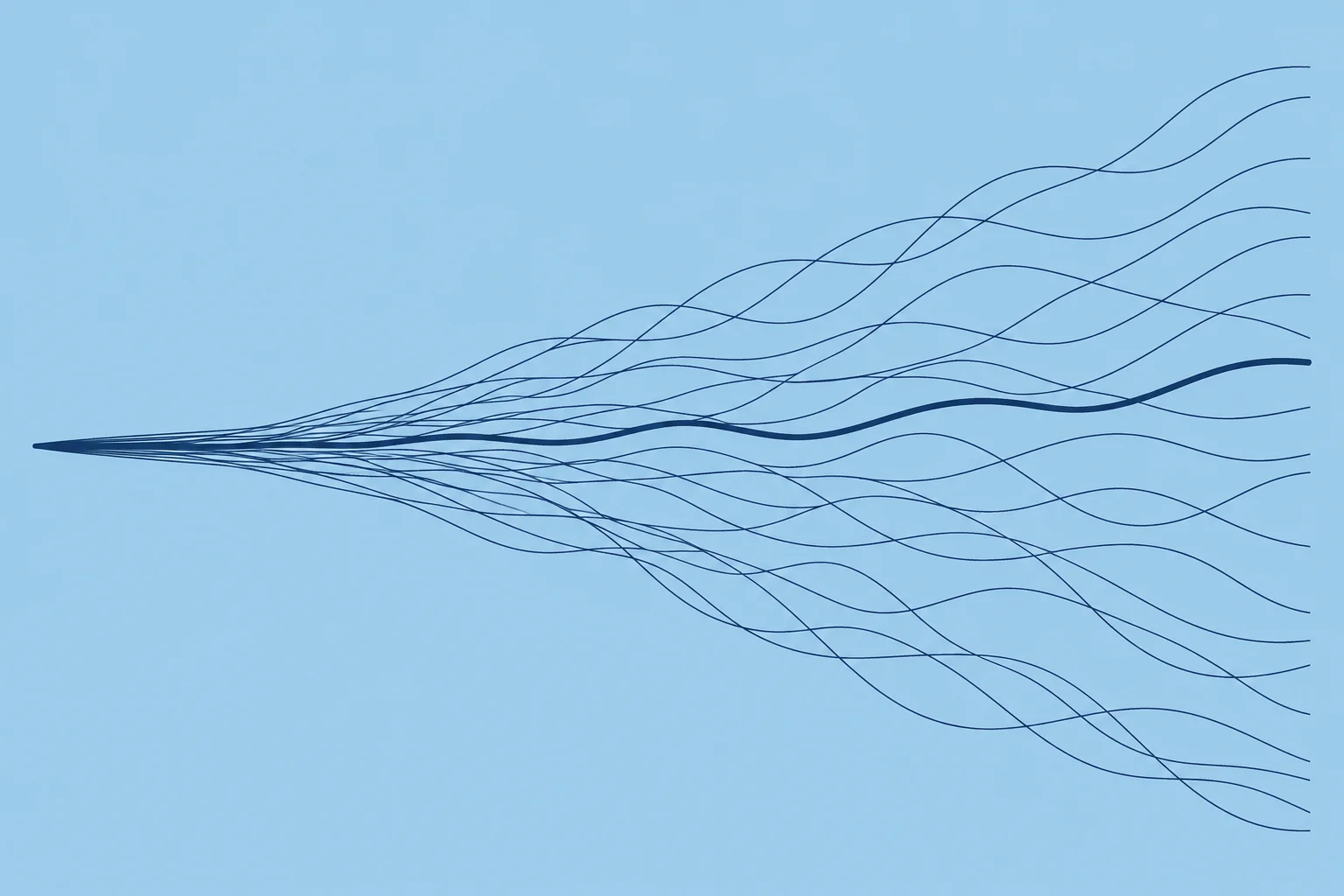
Small errors in today's observations grow as a forecast runs. An ensemble runs the model many times, each member starting from a slightly different state. Close agreement suggests greater confidence, but members can share errors and miss local effects; wide spread signals uncertainty.
Main ensembles
ECMWF's ENS has 51 members at about 9 km: one uses the unchanged starting state, and 50 use slightly altered starting states. NOAA's GEFS has 31 members at about 0.25°. Both run four times a day and look out to about two weeks; ECMWF's AIFS also has a machine-learning ensemble.
Spread and probability
The spread is how far the members differ. A narrow spread suggests greater confidence, not certainty. Many apps show the ensemble mean, the average of the members, and exceedance probabilities: estimated chances of wind above a threshold at a selected place and valid time, such as more than 25 knots.
The mean hides extremes
The ensemble mean smooths the members out. If half the members predict 36 knots and half predict calm, their mean wind speed is 18 knots—a fresh breeze that no member predicted. Look at the spread and at the strongest members, not just the mean.
Using it
Check exceedance probabilities against your stated wind limit at the places and times you expect to pass. A probability at one point and time does not give the chance of exceeding your limit anywhere during the passage. Where member data are available, count members that exceed your limit somewhere along your route at your passage times. Check official forecasts and warnings too.
Key figures
- ECMWF ENS
- 51 members: one unchanged start and 50 varied starts, about 9 km
- NOAA GEFS
- 31 members, about 0.25°
- Spread
- Narrower spread suggests confidence, not certainty.
- Ensemble mean
- Smooths out extremes; check the members too
Remember
- An ensemble runs a model many times from slightly different starts.
- ECMWF ENS has 51 members; NOAA GEFS has 31.
- Spread shows disagreement; exceedance probabilities estimate the chance of crossing a limit, without guarantees.
- The mean hides extremes; check the strongest members against your limits.
Common mistakes
Wrong: The ensemble mean is the most likely wind.
Right: It can show a value no member forecast. Look at the spread and the members.
Wrong: A detailed single run needs no ensemble.
Right: A single run shows one possibility. An ensemble samples other plausible outcomes.
Worked case
For a crossing in three days, the ensemble mean shows 15 knots at the worst point. The probability of more than 25 knots is 35 %. Your limit for this crew is 22 knots. Do you go?
Show the answer
At the stated place and time, the estimated chance of exceeding your 22-knot limit is at least 35%: every outcome above 25 knots also exceeds 22. Outcomes between 22 and 25 knots could increase it. The 15-knot mean does not make this acceptable. Check the probability above 22 knots and its evolution across relevant places, times and runs, alongside official forecasts and warnings.
Practice question
How many members does the ECMWF ENS have?
- 11
- 21
- 31
- 51
Show the answer
Answer: D. ECMWF ENS has 51 members: one unchanged starting state and 50 slightly altered ones.
5 · Gusts & limits
Mean wind, gusts and what models miss
In these files, wind is a mean at 10 m over a grid box. Gusts can be stronger, and local effects may be missed. Pair them with official forecasts.

Mean wind
The usual GRIB wind is the 10 m wind: the mean wind 10 m above the surface, averaged over a grid box. The mean wind and gusts are explained in the Local winds unit. Gusts are short bursts above the mean, and the GRIB arrow does not show them.
Gusts
Many models also provide a gust parameter: ask for it. Without it, a rough rule over open sea is to add about 20–40 % to the mean for gusts. More in unstable, showery air, near cold fronts and in the lee of land. Example: a mean of 18 knots suggests gusts of about 22–25 knots, perhaps 30 or more in a squall.
What coarse models miss
Coarse global models smooth out small features. They often miss sea breezes, coastal acceleration round headlands and through straits, wind shadows behind islands, and the exact strength and timing of fronts. Their coarse grids cannot reliably resolve individual thunderstorms or squalls. Regional models help near the coast but still miss much of it.
No warning status
These files contain model output, not forecaster-edited marine bulletins or official warnings. Read official forecasts and warnings first, then use model output for additional detail, keeping its limits in mind.
On passage
Compare observed true mean wind with the forecast for the same place and UTC. If conditions differ, reassess your margins and obtain updated official forecasts and model output. Do not assume the discrepancy will disappear or persist unchanged.
Key figures
- GRIB wind
- 10 m mean wind over a grid box
- Gust rule of thumb
- Mean + about 20–40 % over open sea; more in showers
- Worked gusts
- 18 kn mean → about 22–25 kn gusts
- Often missed
- Sea breezes, coastal acceleration, wind shadows, squalls
Using GRIB files in a passage decision
- Read the official forecast and warnings for the whole route first. — They carry official warnings and a forecaster's judgement; these files do not.
- Download the latest run from two models, with mean wind and gusts. — Agreement between models raises confidence.
- Use forecast gusts where available. Apply the rough 20–40% allowance to mean wind only when gust output is absent; assess local effects separately. — Neither modelled gusts nor a fixed allowance guarantees the strongest wind you may meet.
- Check spread and exceedance probabilities at relevant places and times. — Spread shows disagreement; exceedance probabilities estimate threshold risk.
- Compare forecast conditions with your go/no-go limits, leaving a margin. — Limits agreed beforehand help you avoid an optimistic decision.
- At sea, compare the forecast with real wind, sky and barometer. — A mismatch calls for reassessment, not an assumption about later conditions.
Remember
- GRIB wind is a 10 m grid-box mean; ask for the gust parameter.
- Without it, add about 20–40 % for gusts over open sea, more in showers.
- Coarse models miss sea breezes, coastal acceleration, wind shadows and squalls.
- These files carry no official warnings: read official forecasts first.
Common mistakes
Wrong: The GRIB shows 15 knots, so the boat will see 15 knots.
Right: That is a mean over a grid box. Gusts can exceed it, and local effects may strengthen the wind.
Wrong: No gale on the GRIB means no gale warning.
Right: Warnings come only from official forecasts. Check them every time.
Wrong: Add 30 % and the gusts are covered.
Right: The rule is rough. Squalls and coastal effects can be far stronger.
Worked case
Your GRIB shows a north-westerly of 16 knots mean along a coast with a high cape and a 3 NM strait between an island and the mainland. The official forecast says force 5 to 6, locally 7 near capes. Your crew prefers the GRIB. What wind do you plan for?
Show the answer
Plan for the official force 5–6, with force 7 (28–33 knots mean) near capes and higher gusts. The 16-knot model mean may smooth out local effects. Check gust output and updated warnings, then compare those conditions with your boat and crew limits before committing.
Practice question
What does the standard GRIB wind arrow show?
- The strongest gust
- The 10 m mean wind
- The masthead wind
- The wind at 1,000 m
Show the answer
Answer: B. It is the mean wind 10 m above the surface over the grid box.